Free business template

Free business expense tracker template

Enter your work email to instantly download the editable Excel workbook, or scroll down to preview real rows from the tracker first.
Free Excel template. Instant download. No account required.
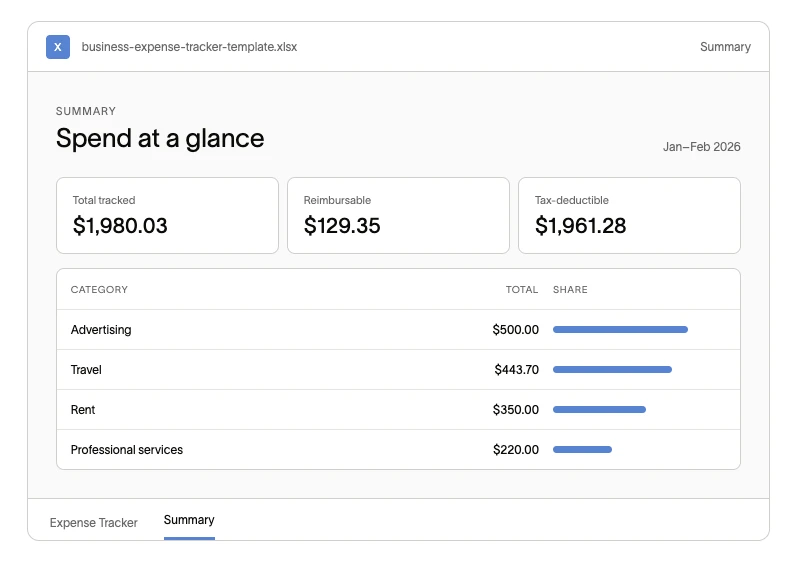
Preview of the expense tracker workbook summary tab, showing total spend, reimbursable spend, tax-deductible spend, and category totals

Preview before you download

See real rows from the expense tracker

Here are 6 of the 10 example expenses included in the workbook. The summary preview above shows how those entries roll up automatically.

Expense tracker

Category
Amount
Status
Notion
Software & Subscriptions
$72.00
Tax-deductible
Evans Hotels
Travel
$412.30
Tax-deductible
Long Meadow Ranch
Meals
$43.85
Reimbursable
Red Antler
Advertising & Marketing
$500.00
Tax-deductible
Eventbrite
Travel
$31.40
Reimbursable
MakeStickers
Office Supplies
$89.20
Tax-deductible
Unlock the complete template

Get the complete editable expense tracker

The complete workbook includes 250 editable rows, automatic formulas, dropdown fields, all 10 examples, and 15 preset categories.

Free Excel template. Instant download. No account required.

Built to work on day one

What's inside

Start tracking right away with a structured expense log and a summary that does the math for you.

Expense log

Track every purchase in one place

Record the date, vendor, category, payment method, reimbursement status, receipt status, and tax status for each expense.

Summary tab

Automatic summaries

See totals by category and month, including reimbursable and tax-deductible spend.

Category setup

15 preset categories

Organize expenses around common business deduction categories, from travel and meals to software and professional services.

Four steps

How to use the business expense tracker template

Go from a blank file to a current view of your business spending.

1
Get the template
Download the Excel workbook. To use it in Google Sheets, upload the downloaded file to Google Drive and open it with Google Sheets.
2
Log each expense
Add each purchase to the Expense Tracker tab as it happens.
3
Choose the details
Use the dropdowns to select the category, payment method, reimbursement status, receipt status, and tax status.
4
Review live totals
Use the Summary tab to review spending by category and month.

Frequently asked questions

Template questions

Log each expense with its date, vendor, category, amount, payment method, and tax or reimbursement status. Review the Summary tab regularly to spot trends and keep records current.

Yes. The workbook is free to download and use.

The workbook is provided as an Excel file. You can upload it to Google Drive and open it with Google Sheets.

A spreadsheet is useful when expenses are simple and limited. Consider software when you need receipt capture, policy enforcement, approvals, or automated reporting across a team.

The next step

When a spreadsheet stops being enough

A spreadsheet works until you are chasing receipts and updating rows by hand.

Expense management

Automate expense tracking with Ramp

Ramp brings card spend, receipts, categories, and policy checks into one workflow, so finance teams can review expenses without maintaining a shared spreadsheet.
Explore Ramp expense management

Compare your options

Compare business expense tracker options

See the full business expense tracker comparison when you are ready to evaluate software.
Read the comparison
Free Excel template

Start tracking business expenses today

Get the editable workbook with automatic summaries, dropdown fields, and room for 250 expenses.

Free Excel template. Instant download. No account required.