How Ramp customers are running month-end with AI assistants
- 2,500+ businesses have connected Ramp to an AI assistant since January
- "All I do is Claude these days"
- What businesses are doing with Ramp’s MCP and CLI
- 50+ finance tools are live today, accessible through a conversation
- What we’re building next
- How to get started with Ramp’s MCP or CLI
- Chat with our team live!
2,500+ businesses have connected Ramp to an AI assistant since January
Until 2026, every finance AI tool required credentials, custom code, and ongoing developer maintenance. A new standard now lets AI assistants connect directly to business software like Ramp via MCP and CLI servers.
MCP and CLI servers are lightweight “connectors” that let an AI assistant (or your terminal) securely talk to Ramp, so you can ask questions or take actions without building an integration yourself.
Controllers, finance managers, and business owners now run month-end close, reconcile bills, and approve expenses through Claude, ChatGPT, Notion AI, or their terminal.
"All I do is Claude these days"
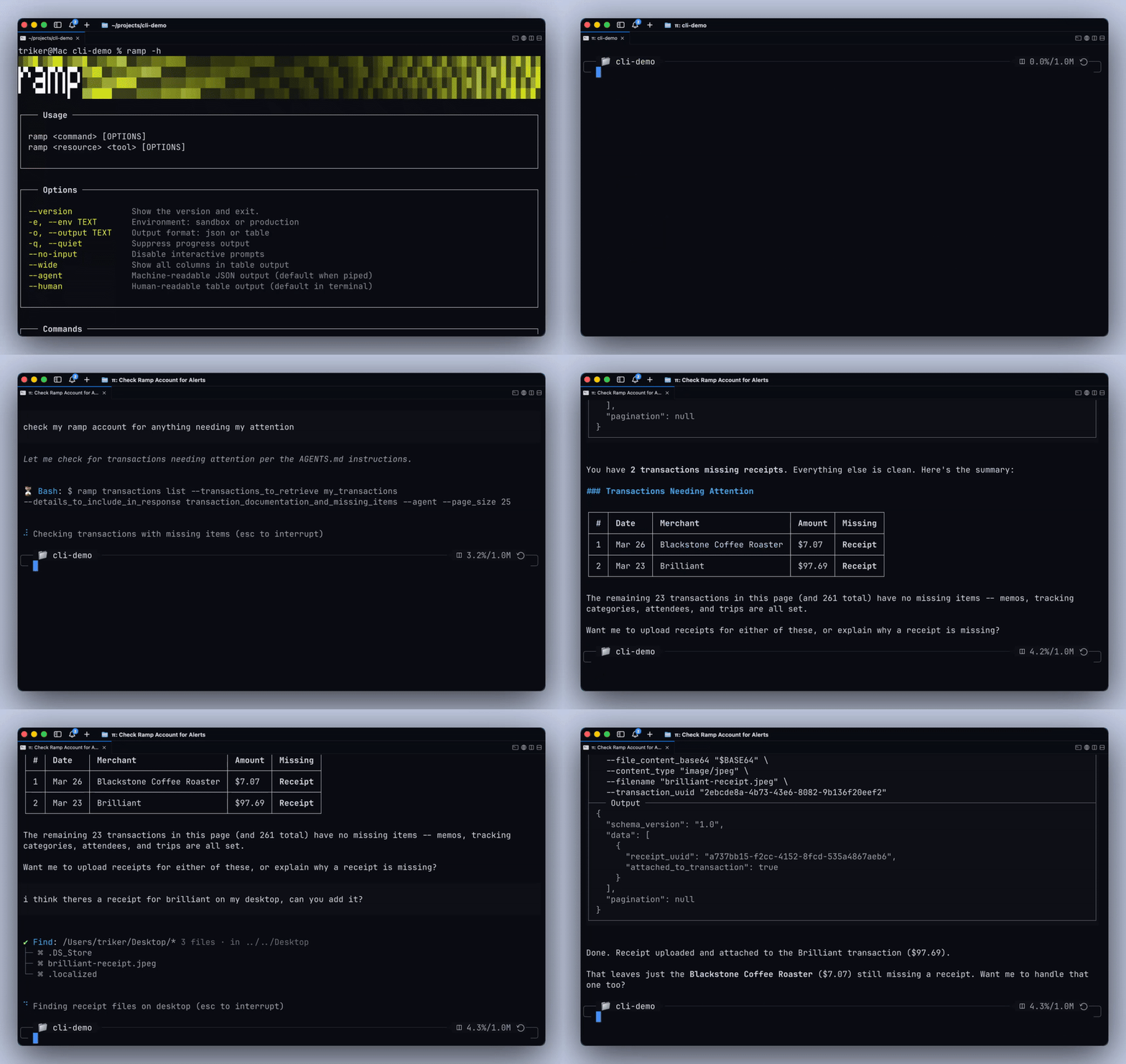
One controller at a logistics technology company has spent over 10 hours tuning Claude to generate financial statements, run flux analysis, conduct internal audits, and build one-click reporting. His goal: run as much of his month-end close and AP process through Claude as possible — and avoid logging in to his ERP entirely.
His view is that any company that doesn’t adopt AI into their financial workflows will fall behind.
But he’s deliberate about where the boundaries are. He doesn’t approve or release payments through AI — that stays in Ramp’s product, where there’s a full audit trail. He’s comfortable letting Claude communicate with vendors, but not yet with customers.
The pattern across early AI adopters is clear: push AI as far as it can go for speed and analysis, but keep humans in the loop for approvals and external communication.
What businesses are doing with Ramp’s MCP and CLI
Since January, adoption of Ramp’s MCP and CLI has grown from 275 businesses to 2,500+. Here are their most common workflows:
What they are doing | % of users who connect weekly |
|---|---|
Pulling spend breakdowns by category, vendor, or month | 52% |
Searching bills, matching invoices, checking payment status | 38% |
Finding missing memos, flagging unsynced transactions | 33% |
Auditing reimbursements and GL codes | 14% |
Batch-approving transactions and reviewing policy exceptions | 12% |
60% of weekly users are business owners, and 36% are business admins — finance operators, not developers. These users aren’t just using Ramp’s MCP and CLI to ask questions. 62% of usage is completion-oriented work like coding transactions, attaching receipts, and approving requests.
50+ finance tools are live today, accessible through a conversation
The same Ramp platform that manages your cards, bills, expenses, and travel now gives AI assistants direct access to act on your data via MCP or CLI. Just ask your AI assistant to:
- Pull every uncoded transaction from last week
- Find the receipt for a specific vendor charge
- Show which bills are pending approval and for how long
- Flag transactions missing memos or out of policy
Get answers in seconds from data already in Ramp — no exports, no spreadsheets.
What we’re building next
More workflow coverage: The most common request we receive: more tools. We’re building for approvals, bill creation, invoice management, accounting coding, procurement intake, and so much more.
Contextual intelligence: Today, coding a transaction through an AI assistant gives you a list of GL categories. Soon, Ramp will suggest the right one based on your company's policies and past behavior.
Agent Cards (alpha): As AI moves from answering questions to taking action, you need a way to give agents access to company funds without giving up control.
Ramp Agent Cards are corporate cards issued directly to AI agents with real spend limits, merchant controls, and full transaction visibility. The same governance that applies to every employee now applies to every agent.
How to get started with Ramp’s MCP or CLI
Connect to the MCP through Claude or ChatGPT (easiest — no install needed)
- Open Claude or ChatGPT
- Go to the integrations or connections settings
- Search for "Ramp" and connect your account
- Start asking questions. Try "show me my uncoded transactions from last week" or "what did we spend on software this month?"
Install the Ramp CLI (for terminal users and developers)
- Run this in your terminal:
curl -fsSL https://agents.ramp.com/install.sh | sh
- Authenticate with your Ramp account
- Access 50+ finance tools directly from the command line
Docs and source: github.com/ramp-public/ramp-cli
Chat with our team live!
Want a walkthrough of integrating Ramp into your AI workflow? Book time with our team.
Not on Ramp? This is what your finance team gets on day one — alongside the cards, bills, expenses, and travel tools that 85,000+ businesses already use. See what Ramp can do.


“I assumed I would have to choose between speed and control. What I found is that you can have both. A well-designed system takes friction out, for the finance function and for everyone else.”
Justin Webster
CFO, Denver Broncos

“A well-run district should not have to choose between getting work done at the school site and keeping control of the dollars behind it. We're not hiring more people to do more jobs, so we have to be smarter about the process. With Ramp, the purchase, the receipt, and the record stay together from the start. ”
Nick Brizeno
Director of Purchasing, San Marcos Unified School District

“In senior living, scale only works if the communities still feel personal. We needed the back office to carry more of the complexity, not the people serving residents. Ramp helped us build that infrastructure, so the experience in the community could stay human.”
Ryan Cole
CFO, Agemark Senior Living

“AI is moving faster than the finance context around it. Prices change, models change, and the value is not always obvious from an invoice. We needed enough detail to know which bets deserved more investment — and which ones did not.”
Greg Cooley
Controller, AngelList

“Invoices, cards, tokens. The categories change but the principle doesn't: know where the money is going, remove the work around it, and make sure the spend is worth it.”
Maciej Mylik. Finance
ElevenLabs

“We weren’t trying to retrofit an old finance system. We had a blank canvas, and Ramp gave us the foundation to build a global finance function of the future.”
Justin Dourado
Director of Finance, Othership

“There's just no surprises anymore. No more waiting two months to find out how a job did. We know how it's doing as it's happening.”
Erich Kuss
Financial Systems Manager, Infinity Home Services

“More token spend isn’t proof that AI is working. Less isn’t proof that it isn’t. What matters is whether we’re buying the right level of intelligence for the work. Ramp lets us make that judgment in the same place we manage every other type of spend.”
Cody Nutt
Senior Director of Business Systems, Daxko
